Thursday, January 11, 2018

JSON Variables, WebDirect in FileMaker 16, Scrolling the Unscrollable

How to Automatically Create Variables from JSON Data in FileMaker

Mislav Kos wrote an incredibly powerful, free custom function for parsing data from JSON files, something you'll definitely want in your tool chest for the future (as the future will include a lot of JSON for most developers).
If you have data stored as JSON, presumably you will want to extract it at some point. And as part of doing that, you may end up assigning that data to variables, whether for better script readability or other reasons. Adding these assignment steps to your script can be tedious, especially when the JSON document contains a lot of data. For instance, given the following JSON document that has key-value pairs for each letter in the alphabet, we would end up having to create 26 "Set Variable" script steps.


Features include handling arrays, typecasting data (dates are saved as dates, numbers as numbers, etc.), handling spaces, and more.  One of the worst parts getting data from web sources is mapping the data properly, mostly because it is boring and tedious.  This free FileMaker example file (at the link) helps relieve that boredom.

Source: How to Automatically Create Variables from JSON Data in FileMaker

Scrolling the Unscrollable


I've never needed a scrollable check box in a popover before, but I have downloaded the free FileMaker example file, just in case:
Howard Schlossberg’s presentation on popovers (FileMaker 13 Popovers) has inspired me on multiple occasions… a favorite takeaway is the idea that you can have a scrolling check box set within a popover.

Bonus:  you can scroll other types of static fields, including container fields. More info at the link.

Source: Scrolling the Unscrollable | FileMakerHacks

FileMaker Server 16: Multiple Worker Machines


This was posted in May, but is still worth reading for a good overview of  WebDirect in FileMaker 16:
The FileMaker 16 platform includes FileMaker Server and introduces the ability to have multiple "worker" machines connected to a single FileMaker database server or "master" machine. This is mostly relevant to FileMaker WebDirect, which has greatly improved with the latest version.

This involves an understanding of the different services running as part of FileMaker Server, only one of which is the database server itself. There are also web publishing and scripting engines, among other services. Most important here is the Web Publishing Engine (WPE). That’s where WebDirect sessions are run from. FileMaker 16 introduces some changes to how WPE is managed in the FileMaker Admin Console.

The routing of clients to lower traffic hosts on the worker machines is worth noting.  So is the increased performance:  My clients WebDirect pages are waayyyy faster than the FileMaker client when run on the same machine.  It's almost embarrassing.  It's also often the best solution for the client.

Source: WebDirect in FileMaker 16 - New Features and Capabilities


We cannot put off living until we are ready.

Jose Ortega y Gasset


How to Automatically Create Variables from JSON Data in FileMaker

If you have data stored as JSON, presumably you will want to extract it at some point. And as part of doing that, you may end up assigning that data to variables, whether for better script readability or other reasons.

Adding these assignment steps to your script can be tedious, especially when the JSON document contains a lot of data. For instance, given the following JSON document that has key-value pairs for each letter in the alphabet, we would end up having to create 26 "Set Variable" script steps.

Source: How to Automatically Create Variables from JSON Data in FileMaker

Tuesday, January 2, 2018

FM to Google Translate, Indexing Secrets, FM to Zapier

It's a brand new year and lot's of exciting things are happening in the FileMaker world!


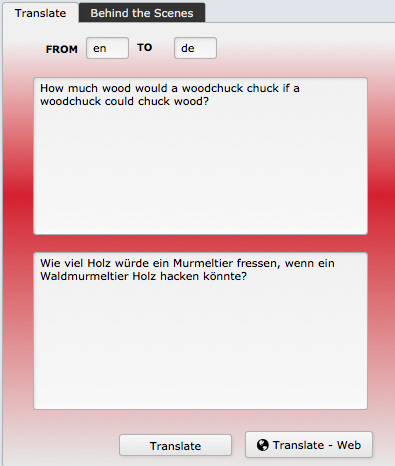
Translating using Google Translate with FileMaker


It turns out to be pretty easy, but costs for every word translated. I'd like to find a way to translate labels and tags in FileMaker on the fly – and store them of, course, for later use.  That would allow a user to translate a database into their language on the fly.  There would be limitations, of course, but still would be interesting.

Translation

There's also a free example file at the link (kudos to Douglas Alder for this).

Source: Making FileMaker interact with Google Translate | HomeBase Software

Indexing Text vs Numbers


Honza did some interesting – and eyebrow raising – testing on indexing text and numbers.  One of his startling conclusions:
The longest search time was measured when searching in indexed text field containing unique values. It was even almost twice as slow as searching in unindexed field.

There's more:
If you are likely to have repeating values from a value list in your field, having a value index is definitely going to help. If you’re going to store natural text in your field and likely to search for words that appear many times, word index is probably going to be your friend. But if your text field is going to hold unique values, the index overhead is something you may want to avoid.

Read Honza's post if you need to optimize indexing on your databases.  Or even if you don't...it's valuable insight.

Source: Text or Numbers – What’s Faster

Connect FileMaker to Zapier (and to hundreds of services) for free


This was announced at Devcon 2017 and requires some beta testing and setup, but the benefits are awesome:
The fmGateway for Zapier allows your custom FileMaker apps to communicate with a huge number of web applications using Zapier. For example:
  • new leads from your website can be automatically collected into your database

  • ecommerce orders can be imported automatically

  • SMS updates can be sent automatically to alert clients in changes to their order

  • customers can be automatically subscribed to your newsletter

  • invoices can be sent via PayPal or Invoice Ninja

  • updates can be sent to Slack and vice-versa


Every FileMaker developer knows the future lies in integrating with the rest of the world.  This tool will make that task easier.

Source: FREE fmGateway for Zapier – soSIMPLE Software/Paradise Partners


Monday, December 18, 2017

Company and Subcontractor Management

Company and Subcontractor Management


Susan Fennema, Chaos Eradicating Officer (CEO) of Beyond the Chaos, and I discuss the ins and outs of company and subcontractor management in the third video in our 6 video series.  There will be three more videos in the New Year.


Today, we talk about communications, on boarding, and helping subcontractors manage their time and obligations:

[embed]https://youtu.be/P_YwvHZzqxg[/embed]

What are the communication requirements for the team?


  • Should a sub speak to a client without you or a team member present?

  • What internal software tools does your team use that a sub might need to be involved in and how much do you WANT them in it? (Slack, Basecamp Chat, etc)

  • Separation between employee-conversations and sub conversations

  • Recommend against ever giving out personal cell phone numbers - set up conference calls or use Slack to call out

  • Consider setting up a company email address that subs use to communicate to clients or all written communications go through project management tool


How do you bring a sub on board?


  • Explain the company structure

  • Training vs jumping in

  • Senior vs junior devs

  • On boarding process (and off boarding process)

  • rReviewing work before sending to the client (Q/A)


As a sub, how do I manage working with different clients and keeping time obligations?


  • Blocks of time on the calendar

  • Confidentiality - especially when working with some of the same people at other shops

  • Multiple project management packages? Set them as your startup pages on the web and go to your tasks for that client

  • Explain what happens if a client puts something on hold

  • Ask for more work if you have a gap

  • Understand expectations and COMMUNICATE - over communicate your availability and how you can be contacted

Join Susan and I in the New Year with three new videos:


  • Communicating with your Project Manager

  • Meeting Expectations 

  • Being Responsible as a Developer

Monday, December 11, 2017

Hiring Subcontractors - Setting Expectations

Hiring Subcontractors - Setting Expectations


This week Susan Fennema and I get into the details of Hiring Subcontractors in our second video: Setting Expectations

[embed]https://youtu.be/AGP7bFV91NE[/embed]

What to Expect


What forms should a subcontractor sign before beginning work - and can you even hire a subcontractor?


  • Why you ned an NDA

  • Why you need a subcontractor agreement

  • Non Compete: they can’t work for your client for at least a year

  • 1099 or W2

  • Why subcontractors should be working for others as well, not only you

  • They need to not be full time

  • You can hire as a part time employee, instead

  • If you hire as an employee (even as part-time), you have the different state’s workmans comp, taxes, etc to take care of (but Quickbooks can help


How are you going to track their time or pay them?


  • What software, if any, do you use a software to track time to the client

  • How will the sub access it

  • Do you want invoices, or do you just pay from your time-track software

  • Will you do flat fees from subs or time-based

  • How quickly do you pay?

  • How to handle training, coming up to speed, and executing for billing

What kind of commitment do you need from them?


  • Be clear about how many hours you need from them (and expect to get less)

  • Set expected availability to answer questions/attend meetings

  • Talk to them about ghosting - be proactive


Thanks for joining us today and be on the lookout next Monday, December 18th, for the third video in our series:

Company & Subcontractor Management


Wednesday, December 6, 2017

The Function-Separation Model, 5 Lessons Learned by Almost Dying

A novel twist on the Separation model:  The Function-Separation Model


John Renfrew, Director at Attitude in the UK, wrote about using the new FileMaker 16 Card window function in a unique way:  Add new functionality by calling a separate function file that does all the work (you send it parameters), returns the info to the calling file, and then goes away.  He calls it the Function-Separation Model:
Keeping the functionality in a single place means that when improvements or fixes are added, they can be inherited by every single file that uses the Function-Separation file without any alterations to the calling file. The method outlined is also lightweight in your solution and leaves little visible trace of where the functionality originates.


Free Demo File


There is a free demo file at the link to help you get your head around this concept.  Basically, to add new functionality, you would do what most programmers in other computers languages already do:  call an external function with parameters, let that function do it's magic, grab the results, and process them using JSON parsing tools and such.

This makes it easier to add functionality to already existing solutions, but also raises questions about data security:  How do you limit who can call the action or see the results?  And does it open a path back to the main solution?

I like the path this is taking, and want to see more along this line.  FileMaker is changing - mostly catching up - and it's fun to be part of the experience.

Source: (19) The Function-Separation Model for FileMaker development | LinkedIn


5 Lessons Learned by Almost Dying


Inspiring, spiritual Tedx video of a woman who miraculously survived cancer on her death bed. She went from there to healed in very short order and is now sharing her experience:

[embed]https://www.youtube.com/watch?v=rhcJNJbRJ6U[/embed]

The five lessons she shares are worth your time.


How people treat you is their karma; how you react is yours.

Wayne Dyer

Monday, December 4, 2017

Managing SubContractors (Videos)

Managing SubContractors and Project Management


Join Susan Fennema – Chaos Eradicating Officer, Beyond the Chaos , Brandon Hayes (Director of Business Relations – Kalos Consulting, Inc.) and me in the first of six videos on Managing SubContractors and Project Management.

The video series started today on Facebook at 11 Eastern...and I have shared it on YouTube, as well:

https://youtu.be/NJ5GtgGutlk

In the first video, Brandon joins Susan and me to discuss finding, vetting, and integrating subcontractors or employees into your business.  Among other things, we talk about the following:

Vetting: Finding and onboarding subcontractors

  1. How do I know who I am looking for?:
    1. Think through what your desired qualifications are:
      1. Do you need someone Certified?

      2. How accessible do you want them to be? Remote? Come in to an office? Moonlight or dedicated contractor?

      3. What other skills/languages do they need experience in?

      4. Balance budget vs skill


  2. Great, so where do I find this person?
    1. Kalos has the luxury of referencing a network of contractors and developers, but if you don’t, go where the developers are:
      1. FM User groups

      2. Job boards (though we know that the best employees are not there)

      3. Networking/referrals


  3. So I’ve found someone. Now what?
    1. Communication, communication, communication
      1. Make sure you set a clear outline of what you’re expecting from them, when you have deadlines, when they’ll be paid, do you provide an FMP license or do they need to bring their own?


    2. Backend setup (preview for next week)
      1. Paperwork, contracts, NDA, payroll


    3. Sound like a lot? Kalos will take care of it for you


And lot's more.  Watch the video to learn more.

Join us next week for Part 2


Join Susan and me next Monday at 11 EST for the second video in the 6 part series when we discuss:

Setting expectations:


What forms should a subcontractor sign before beginning work - and can you even hire a subcontractor
  • NDA

  • Subcontractor agreement (non-compete?) They can’t work for your client for at least a year

  • 1099 or W2

  • Full or Part Time

  • Part time employees?

  • If you hire as an employee (even as part-time), you have the different state’s workman's comp, taxes, etc to take care of (but Quickbooks can help)

How are you going to track their time or pay them?


  • Do you use a software to track time to the client (Slack, Trello, FileMaker?)

  • How will the sub access it

  • Do you want invoices, or do you just pay from your time-track software

  • Will you do flat fees from subs or time-based

  • How quickly do you pay?


What kind of commitment do you need from them?


  • Be clear about how many hours you need from them (and expect to get less)

  • Expected availability to answer questions/attend meetings

  • Ghosting (as in disappearing)